
Using Family-Cloud as Your Private Family Cloud Storage
In today’s digital world, families generate tons of data—photos from vacations, school projects, shared documents, and even video calls with far-flung relatives. But relying on big tech clouds like Google Drive or Dropbox means handing over your privacy to corporations that scan your files for ads or face data breaches. What if you could have unlimited, secure storage that’s all yours?
Enter Family-Cloud, an open-source powerhouse that lets you build your own private family cloud. It’s like Dropbox on steroids, but you control the keys.

What Is Family-Cloud, Anyway?
Family-Cloud is a self-hosted platform for cloud storage and collaboration. Think of it as your personal Google Drive alternative: store files, sync them across devices, share with family, and even chat or video call—all without Big Tech peeking in. It runs on your selected hardware (like a home server or Raspberry Pi), keeping your data safe at home or in a trusted spot.
Unlike commercial services, Private-Cloud grows with you. Add hard drives for more space, install apps for calendars or photo galleries, and invite family members with their own logins. It’s perfect for households juggling schoolwork, family albums, and gran’s recipes.
Why Choose Family-Cloud for Your Family's Private Cloud?
Big clouds are convenient, but they come with strings attached.

Here's why ditching them for Private-Cloud makes sense:
1. Bulletproof Privacy and Security
Your data stays on your server—no one else accesses it. Family-Cloud supports end-to-end encryption, so even if someone hacks in, your files are gibberish without your key.
Avoid scandals like data leaks or targeted ads based on your vacation pics. As one family user shared, “It’s been running for years without interruption, keeping our private shares truly private.”
2. Unlimited, Cost-Effective Storage
Tired of 15GB limits? Family-Cloud scales infinitely—just plug in more drives. Setup costs under £150 for the basic eco friendly box, and storage is only limited by your wallet.
No monthly fees and storing your family’s data on somebody else’s servers.
3. Family-Friendly Features Beyond Storage
Sync Everything Seamlessly: Auto-backup phone photos, share folders with kids’ school files, or collaborate on grocery lists.
Built-in Tools: Calendar for family events, Contacts app for shared address books, Talk for secure video chats, and Deck for simple task boards (like planning birthday parties).
Mobile apps make it feel like any cloud—iOS, Android, desktop—all in sync.
4. Full Control and Customization
Set user quotas (e.g., 500GB per family member), permissions (read-only for shared albums), and even integrate external drives.
Open-source means constant free updates from a global community—no vendor lock-in.
5. Eco and Future-Proof
Run it on low-power hardware to save energy. Plus, own your data forever—no service shutdowns stranding your memories.
Keep Everyone on the Same Page
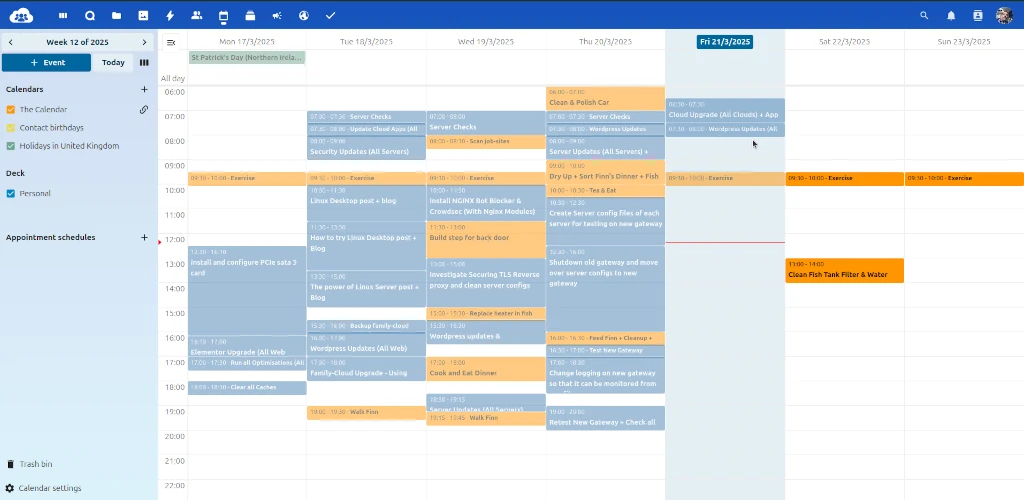
Family life is busy—school events, family occasions, doctors visits. Family-Cloud has a calendar and to-do list you can share with everyone. Add movie night or a dentist appointment, and the kids or your partner can see it on their phone or tablet. It’s like a family planner that keeps things running smoothly, no forgotten plans here!
Chat and Call, Just for Family
Family-Cloud lets you message or video call each other without using apps like WhatsApp or Zoom. It’s built-in, safe, and private—no one outside the family can listen in. Whether it’s a quick chat with the kids or a call to catch up with relatives, it’s a secure family communication tool that’s simple to use.
*To make video calls between more than 2 people a booster box is required. Allowing multiple calls between multiple people to be made from your Family-Cloud.
A Space for Kids to Learn and Play
Give the kids their own spot on Family-Cloud to save schoolwork, a safe copy of Uni work, drawings, or fun videos. They get to organize their own things while you keep everything safe as the boss of the cloud. It’s a great way to teach them about tech without the mess of shared computers—and it’s all part of your Family-Cloud family setup.
*A bolt-on box is available to allow subscription-free document creation and editing without having to install an office suite on your devices.
In short: Family-Cloud isn’t just storage; it’s a private hub that brings families closer while keeping snoopers out.
Want to give it a try?
See here for more details: Family-Cloud and enjoy a safer, simpler way to connect. It’s a little change that makes a big difference for your family!