
In today’s digital age, having a platform to share your thoughts, ideas, or expertise is easier than ever. I wanted a space to connect with a global audience, so I built a blog using a custom domain name, a self-hosted LEMP stack, and WordPress. This setup gave me full control, blazing-fast performance, and a professional online presence. In this post, I’ll walk you through how I did it, why I chose these tools, and how you can do the same.
The LEMP Stack
The LEMP stack is a powerful combination of software used to run dynamic websites like WordPress. It stands for:
Linux: The operating system.
Nginx (pronounced “Engine-X”): A high-performance web server.
MySQL/MariaDB: A database to store your WordPress content.
PHP: The programming language that powers WordPress.
I chose a self-hosted LEMP stack for my WordPress blog because:
Performance: Nginx is lightweight and handles multiple connections efficiently, making my site load faster.
Control: Self-hosting means I own my server environment, from security settings to software updates.
Cost-Effectiveness: By hosting on my own VPS (Virtual Private Server), I avoided expensive managed Server and WordPress hosting plans.
Scalability: A LEMP stack can handle growing traffic as my blog gains popularity.
Why WordPress?
I chose WordPress because it’s a versatile, user-friendly, and powerful platform that suits both beginners and experienced users. Here’s why it was the perfect choice for my self-hosted LEMP stack setup:
Ease of Use: WordPress has an intuitive dashboard, making it simple to write posts, add media, and manage my site without technical expertise.
Customization: With thousands of themes and plugins, I could design a unique blog and add features like contact forms or e-commerce without coding.
SEO-Friendly: Plugins like Rank Math make optimizing content for search engines straightforward, helping my blog rank higher for keywords like “self-hosted WordPress blog.”
Community Support: WordPress powers over 40% of the web, so there’s a massive community, tutorials, and forums for troubleshooting.
Flexibility: It supports everything from simple blogs to complex sites, allowing me to scale as my audience grows.
Self-Hosting Compatibility: WordPress works seamlessly with a LEMP stack, giving me full control over performance and security on my server.
Make it secure and fast
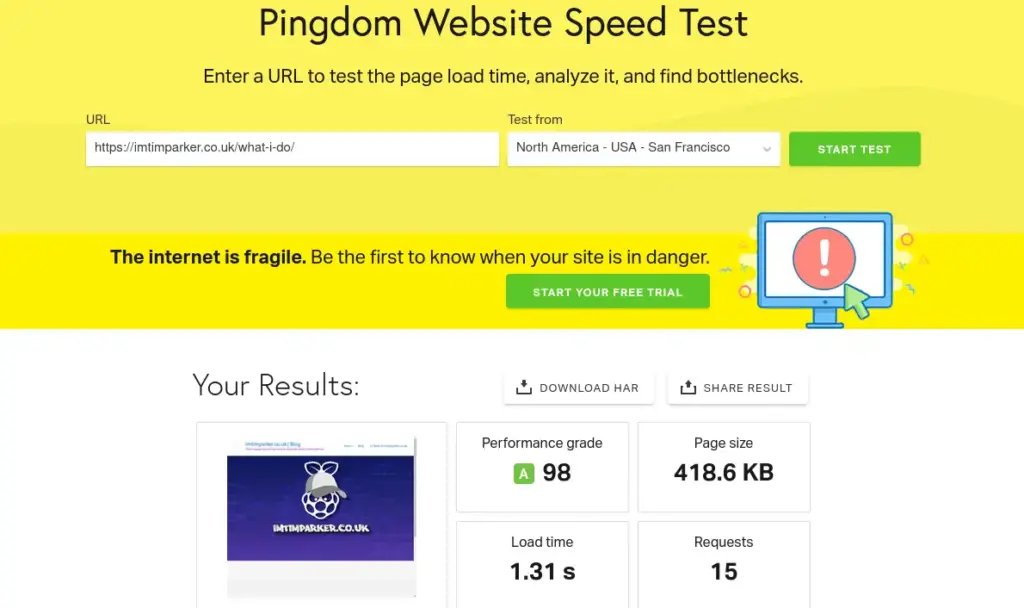
A key reason for the choice of this platform is that every layer is very tunable for both speed and security:
linux server is lean and fast, the OS of choice for the web. It can be locked down with file/directory permission and firewall. There are also plenty of free tools available to lock it down tighter.
Nginx is fast out of the box but leaves plenty of room for adding performance depending on your needs. It also caters for server-side caching to add speed to your web pages. It also offers lots of security tweaking potential beyond certificates for https.
MySQL or MariaDB. I chose MariaDB over MySQL for my database because 1. Improved query optimization and faster performance for common WordPress operations. 2. MariaDB is fully open-source and community-driven, ensuring regular updates and transparency, which aligns with my preference for control over my self-hosted stack. 3. MariaDB includes modern storage engines like Aria and better thread handling, which can handle higher traffic.
PHP (Required for WordPress). The writing has been “apparently” on the wall for PHP for years but, it still powers over 70% of websites with a known server-side language. Newer versions and server settings have dealt with the old security issues and it’s large community and open-source nature means threats get dealt with fast. V8.3 when optimised for speed and security handle WordPress (Which requires PHP) very efficiently.
Using a custom domain, self-hosted LEMP stack, and WordPress, I created a platform that’s fast, secure, and fully mine. Here’s how it helps me reach a global audience:
Speed: My LEMP stack ensures quick load times, keeping visitors engaged.
Reliability: Self-hosting gives me uptime control, unlike shared hosting.
Flexibility: I can tweak my server or WordPress setup as my blog grows.
Global Reach: My domain and SEO-optimised content attract readers worldwide.
With these choices though, the customisation options are almost endless and can lead you down a bit of a rabbit hole if you don’t stay focused on your goal. For me it’s been a tiring, frustrating but, in the end a satisfying journey that’s allowed me to maintain full control over my data, which has always been the main goal.
* NOTE: The number 1 Rule = Backups. Backup and test backups regularly. Without them those oops are painful.
Till next time. To Webservers and beyond.
Tim